There are five real shapes of answer to this, and the best daily dashboard app for you depends on how much you want to build and how much of your life you want on one screen. Apple's widgets are free and already on your phone. Notion is the most flexible and the one you have to make yourself. WHOOP and Oura go deeper on one subject than anything else here, and that subject is your body. Hermes is the closest thing to a true multi-source personal briefing, at $79.99 a year. And oneTap, which I build, is the one that does something with your attention after you've finished reading.
One warning before any of it. Search the phrase and most of page one is business intelligence — Tableau, Geckoboard, Databox, roundups of "dashboard software" built for company KPIs. Those are excellent products for watching a funnel and completely wrong for watching a Tuesday. If you landed here from that search, you want the personal kind, and the two categories share a word and nothing else.
What a personal daily dashboard actually is
It is one screen you read once, early, that answers the questions that would otherwise make you open six apps.
That definition matters because it rules things out. A habit tracker is not a dashboard; it wants input, not reading. A news app is not a dashboard; it only knows one domain and it never finishes. A BI tool is not a dashboard in this sense either, no matter how many charts it draws, because nothing on it is about you.
The category is also thinner than the search results suggest. The one genuinely personal roundup I turned up today is a 3,500-word piece on "life dashboard apps", updated in September 2026, naming Discy, Griply, Gyroscope, Exist, Lunatask and Notion. It is a reasonable list. It also does not state a single price for any of the six, which tells you something about how this category gets written about.
The five-second test
Before comparing anything, decide what you are actually buying. A morning dashboard earns its place on your home screen if, in about five seconds, it answers the four questions that otherwise send you into the apps.
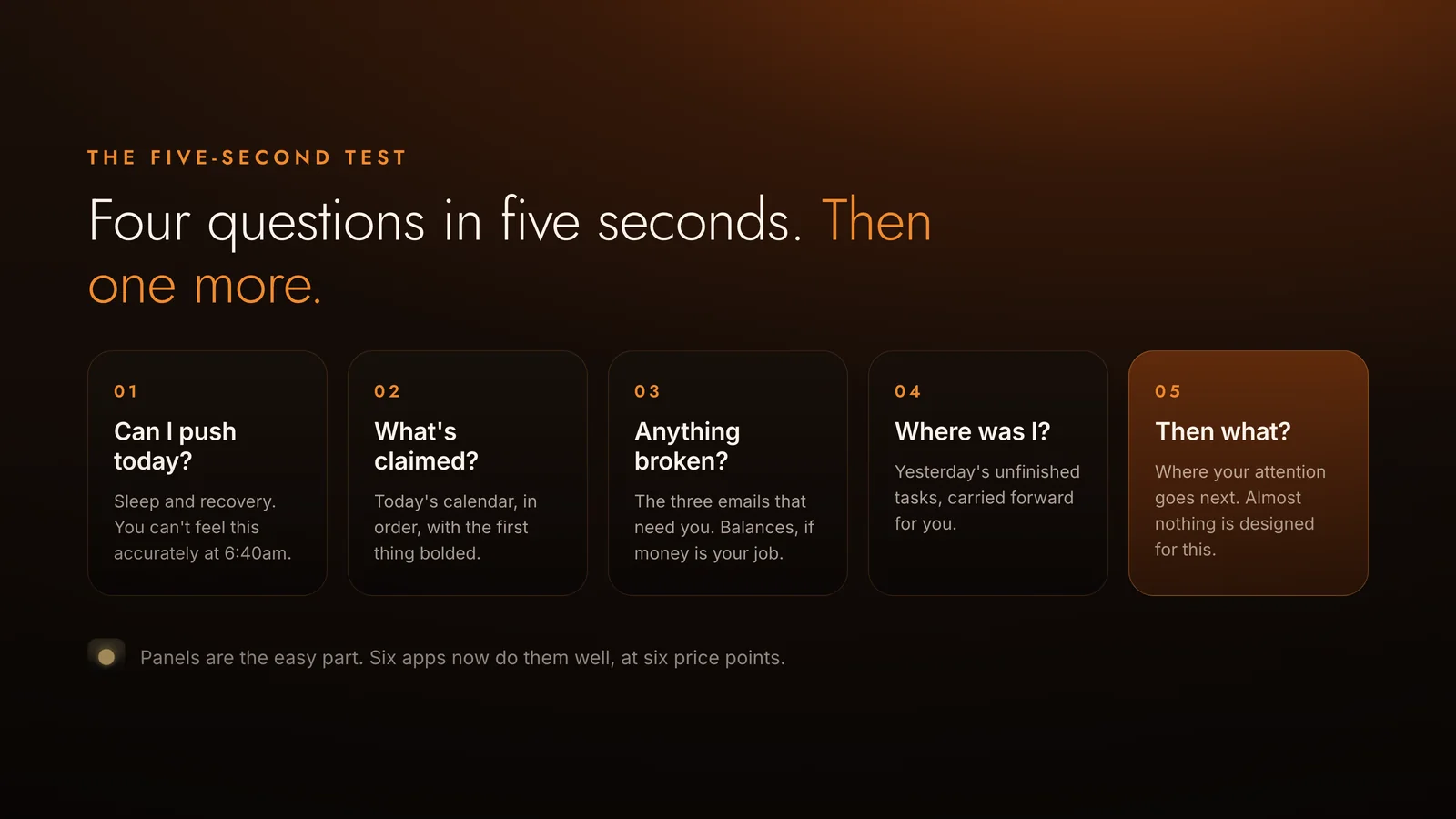
- Can I push today? Sleep and recovery. The difference between a 34% recovery and an 88% one is the difference between two completely different days, and you cannot feel it accurately at 6:40am.
- What's already claimed? The calendar. Not the week — today, in order, with the first thing bolded.
- Did anything break overnight? The three or four emails that actually need you, plus balances if money is part of your job.
- What was I in the middle of? Yesterday's unfinished tasks, carried forward without you re-deriving them.
Weather and headlines are on every one of these products because people check them anyway, and a dashboard that omits them just sends you to another app. Fine. They are the garnish, not the test.
The fifth question is the one almost nothing is designed for, and it is the whole argument of this post: what happens in the thirty seconds after you finish reading? I'll come back to it.
The contenders, with prices checked in November 2026
Every price below was checked in the week of 10 November 2026, against each company's own site or its US App Store listing wherever that was reachable. This category repackages constantly, so re-check before you buy.
Apple's widgets and the Smart Stack — free, and already there
Start here, genuinely. If you have never deliberately built a widget page, you have not yet tried the free option, and the free option is better than it was.
Apple's framing is a glance rather than a read: widgets live on the Home Screen, the Lock Screen and Today View, and a Smart Stack is, in Apple's own words, "a pre-built collection of widgets that displays the right widget based on factors like your location, an activity, or time." You can stack up to ten, turn Smart Rotate on so iOS surfaces what it thinks is relevant, and switch on Widget Suggestions so apps you already use appear at the right moment. iOS 27, out on 14 September 2026, added an extra-large widget size that "takes up an entire app page" for Calendar, Photos and Music.
So you can build a near-dashboard for nothing: an extra-large Calendar page, Weather, Reminders, your bank's widget, your ring or band's widget if it ships one.
Cons. It is a collage, not a read — four or five apps' idea of what matters, in four or five visual languages, with no ordering and no editing. Email is the gap that doesn't close: a mail widget shows you your most recent messages, which is not the same list as the three that need you, and an unread count is the thing that pulls you in rather than the thing that settles you. And rotation cuts both ways: a stack that decides for you is a stack that sometimes isn't showing the panel you came for. Still, for a lot of people this is enough, and anyone selling you a dashboard should say so first.
Notion — $0, or $10 a person a month
Notion is the most flexible product in this comparison and will stay that way. Nothing else here lets you decide what a day looks like and then build exactly that.
Pricing from Notion's own page: Free at $0 per user per month, Plus $10, Business $20, Enterprise on request, with "Save up to 20% with yearly" on paid tiers. For one person building a personal dashboard, the free plan is the honest answer. Custom agents are metered separately at $10 per 1,000 monthly Notion credits. Build time, per the better step-by-step guides, is under an hour from scratch and five to ten minutes from a template gallery dashboard.
Cons, and the first one is structural. Notion knows what you or an integration put into it, and almost nothing in the five-second test arrives that way. There is no sleep score, no recovery number, no inbox triage, no bank balance, unless you build the plumbing — and the morning read is exactly the moment you have no appetite for maintaining plumbing.
The second is mobile, and it is the one people find out after they commit. Notion's own help page lists four iOS widgets: Page, Favorites, Recents and AI shortcuts. They carry an icon and a cover image and they take you into the app. That makes a Notion dashboard a place you go, not a thing you glance at — which is fine on a laptop at 9am and a different proposition in bed at 6:40am.
If you already live in Notion, build the dashboard there and ignore everyone else. If you don't, understand that you are taking on a build and a habit of maintaining it.
WHOOP — $199 to $359 a year, band included
WHOOP is the deepest single-domain morning read available, and I want to be clear about that before the comparison turns against it on breadth.
You wake to a Recovery score from 0 to 100%, computed from heart rate variability, resting heart rate, sleep performance and respiratory rate. Sleep Performance folds sufficiency, consistency, efficiency and stress into one number. Strain runs 0 to 21. The home screen leads on those three dials and then opens into My Day, My Plan and My Dashboard. No line in anyone's brief, mine included, replaces the second screen of that app on a day when your recovery is 31% and you want to know which input did it.
Memberships run three tiers — One at $199 a year, Peak at $239, Life at $359 — with the hardware included in the price, and a monthly option that only opens up after the first twelve-month term. One caveat on those numbers, because I'd rather flag it than pretend: WHOOP's own pricing page refused to load for me this week, so unlike every other price here they come from independent price trackers rather than first-hand. Three of them agree. Check the figure in the app before you commit to it.
Cons. One domain, by design. WHOOP will never tell you about the 9:30 that moved or the invoice that bounced, which is most of what a working morning consists of. And a recovery score with no calendar next to it is a number you have to do something with: the information that you should take it easy today is much less useful than the information that you should take it easy today and you have back-to-back calls until two.
Oura — $399 for the ring, then $5.99 a month
Oura's version of the same idea is a single Readiness score, and as one-number morning reads go it is the most legible thing in this list. The app's Today view leads with Readiness, then recent patterns and suggested actions, and Oura Advisor will discuss your own data with you in plain language.
Oura Ring 5 is the current model, announced on 28 May 2026 and starting at $399, with premium finishes at $499; the older Ring 4 started at $349. Membership is "$5.99 USD/month" or "$69.99 USD/annually" from Oura's own membership page, and the membership is where the scores live — the ring without it is a step counter with a nice finish. So year one is around $469 and year two is $69.99.
Cons. Same shape as WHOOP: one domain, deeper than anyone needs on that domain and silent on everything else. Plus hardware you have to size, buy and charge, and a subscription on top of a $399 purchase, which is the thing people are annoyed about in every review thread.
Hermes and the briefing apps — $79.99 a year
This is the real competitor on breadth, and the most useful thing in this post if breadth is what you came for.
Hermes: AI Daily Brief sends one morning notification and the brief behind it covers, in its own listing, calendar with prep notes, priority mail from Gmail or Outlook with reply drafts, the Slack messages that actually need a response, a markets watchlist, last night's sleep and recovery, weather and matched headlines. It is free to download with Hermes Monthly at $9.99 and Hermes Annual at $79.99, and it holds 4.9 stars from 9 ratings.
Two of those things go past what I ship. Slack is not a oneTap connection, and draft replies are not something oneTap does at all — it reads mail and cannot write it. If your mornings are Slack-shaped, that gap is the whole decision and you should go and read their listing rather than mine.
Cons. Nine ratings is nine ratings; this is a young app and you are an early adopter. It is $20 a year more than oneTap. And a brief delivered as a notification lands you in your notification tray, which is the single most dangerous place to be standing at 6:45am.
The cheap end: Morning, and the weekly-subscription trap
Two more worth naming, because the cheap end of this category is real and the pricing is not uniformly honest.
Morning (by Tamper) is a $0.99 one-time purchase that builds a panel layout from weather, reminders, commute time, news, calendar, stocks, countdowns and the date. It holds 3.6 stars from 23 ratings and sells eight themes at $0.99 each. For a dollar it does more than you would expect, with no health data, no email and nothing that acts on what you read.
Day: Daily Dashboard is free with Day Pro at $4.99 weekly, $9.99 monthly or $29.99 yearly. What it shows is date, city, temperature, day and year progress, market headlines, countdowns, an On This Day fact, a quote and daily picks. That is an ambient dashboard, pleasant and not about your Tuesday — and $4.99 a week is $259 a year if you don't notice, which is more than WHOOP. Watch the billing period in this category.
Worth one line: Daily Dash, which on paper is the closest-shaped competitor to all of this — calendar, reminders, notes, links and an on-device brief across iPhone, iPad, Mac and Watch — is still on TestFlight and "coming soon to the App Store". The shelf is emptier than the search results imply.
oneTap — $59.99 a year
I'll keep my own entry short, since the next two sections are about the thing it does differently.
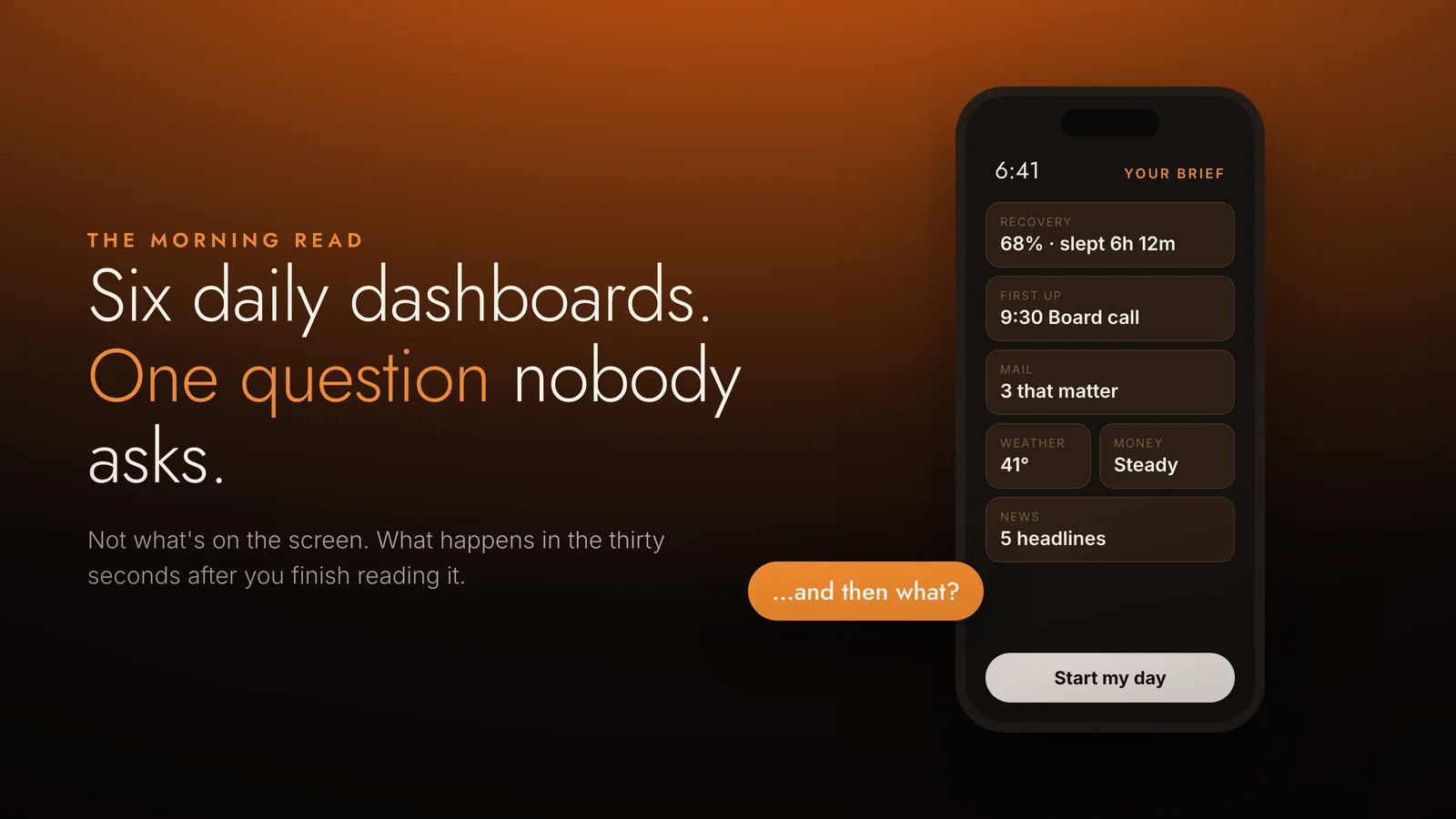
One brief, two to three minutes, read once: how you slept and recovered from WHOOP, Oura or Apple Health, today's calendar, the emails that matter, weather, balances, five headlines, your tasks. A spoken brain dump that sorts itself into a to-do list and a journal. Then the apps you picked go dark for the window you chose, anywhere from 15 minutes to 8 hours. $7.99 a month or $59.99 a year, 7 days free, one plan.
Cons, same four as always. iPhone and iPad only, no Android and no web. No free plan past the trial. The brief is thin until you connect WHOOP, mail and calendar, which is a few minutes of setup on day one. And it's new: a 5.0 average built on 17 ratings, which is a real score and a small sample, and you should read it as one.
Two more that are specific to this comparison and that I'd rather say than have you discover. oneTap is built for one read a day, so it is a worse all-day glance than a widget page. And it has no Slack.
How they compare
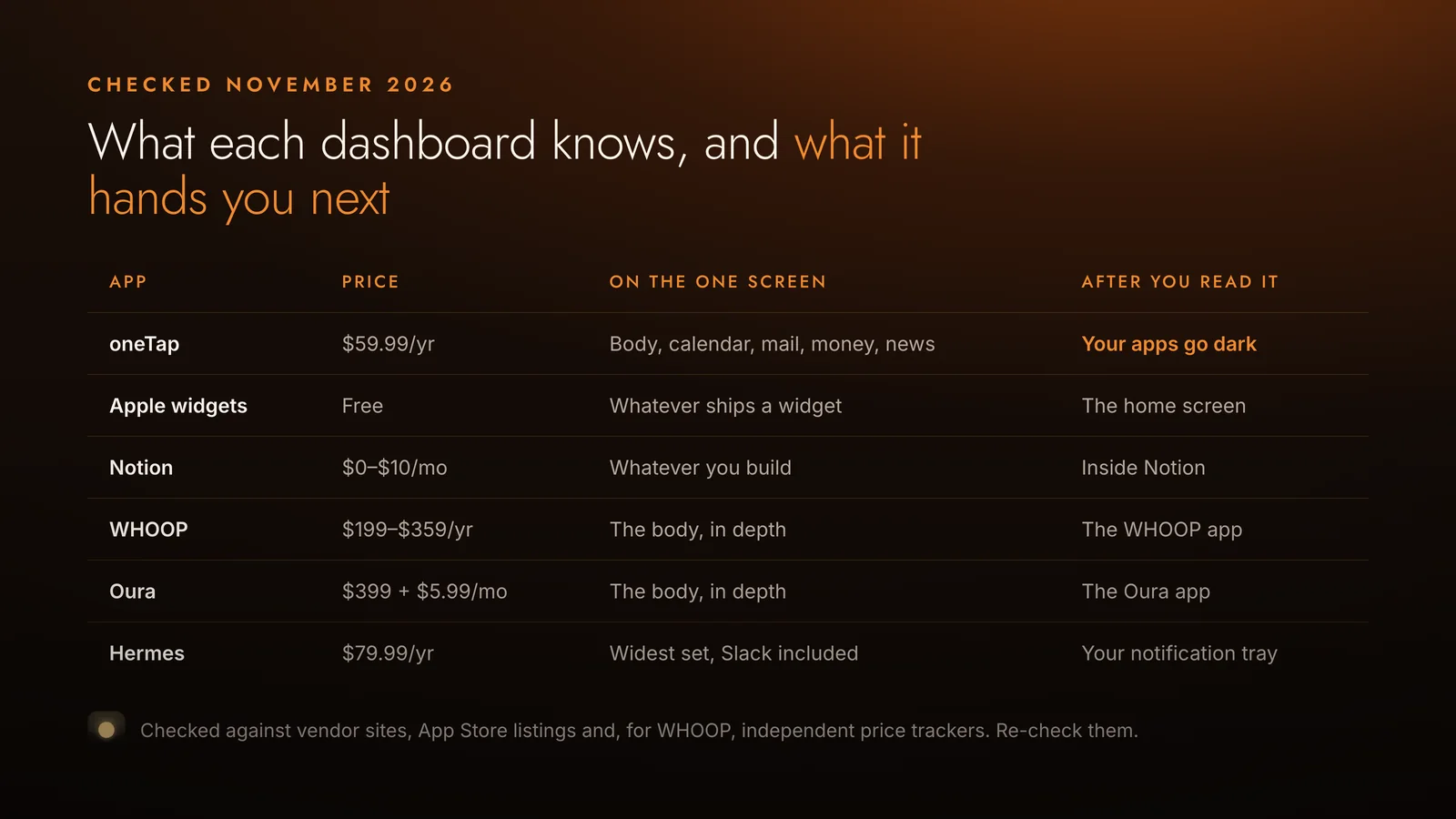
US App Store and vendor-site prices for the week of 10 November 2026, with the WHOOP caveat above.
| App | Price | On the one screen | Depth | After you read it |
|---|---|---|---|---|
| oneTap | $59.99/yr or $7.99/mo | Recovery, calendar, mail that matters, weather, balances, headlines, tasks | A line each | Your chosen apps go dark for 15 min to 8 hours |
| Apple widgets | Free, built in | Whatever ships a widget, rotated by the Smart Stack | A glance each | You're on the home screen |
| Notion | $0, or $10/user/mo | Exactly what you build, and nothing you don't | Unlimited, if you maintain it | You're inside Notion |
| WHOOP | $199–$359/yr, band included | Recovery, Sleep Performance, Strain | Deepest here, on the body | You're in the WHOOP app |
| Oura | $399 ring + $5.99/mo | Readiness, sleep, activity, suggested actions | Deep, on the body | You're in the Oura app |
| Hermes | $79.99/yr or $9.99/mo | Calendar, mail with drafts, Slack, markets, sleep, weather, news | A line each, plus drafts | You're in your notification tray |
What almost every dashboard gets wrong
Here is the part the category doesn't discuss, and it has nothing to do with which panels are on the screen.
You read the brief, the brief ends, and you are holding an unlocked phone with both thumbs free inside the worst sixteen minutes of your day.
A dashboard that answers every question and then leaves you in the feed has not saved you a morning. It has given you a better-informed scroll.
The sixteen minutes is not a figure of speech. Sleep inertia — the grogginess right after waking, when reaction time and judgement are worse than at any other point in the day — averaged 15.8 minutes in a nationwide study of 2,355 adults published in PLOS ONE in January 2026, with a standard deviation of 12.9. Participants with anxiety reported theirs running 14.3 minutes longer, the largest effect the researchers measured, at a Cohen's d of 1.12. Cortisol is climbing 38% to 75% on its own across the same window.
That is the exact window in which every app above finishes its job and hands the phone back to you. The dashboard is the thing that got you to pick it up; the feed is one swipe from where the dashboard ends. I wrote up the three signs that convinced me this was a real problem, and the one I couldn't argue with was how fast a good mood goes — about fifteen seconds of feed.
This is also why "just use widgets" and "just build it in Notion" are incomplete rather than wrong. Both get you an informed start. Neither one changes what the phone offers you the moment you look up.
Where oneTap fits
The brief is the dashboard half, and it stands on its own: everything in the five-second test, in one read, with no page to build and no plumbing to maintain. Where it differs from the five products above is that the read is the start of a sequence rather than the end of one.
When you finish and tap "Start my day", the apps you picked go dark for the window you set. There is no early-unlock button inside the app — no "one more minute", no "ignore for today" — so the window runs to its end. 15 minutes to 8 hours; 90 minutes is the number most people stick with. Nothing is blocked by default: you pick each app, or a whole category like Social, and Phone, Messages, Maps and anything you didn't choose stay open the entire time.
There are three other ways a block can start, if the morning read isn't the trigger you want. Place fires when you arrive at the office or the gym and lifts when you leave. Card is an NFC tag you tap. Anytime you start by hand. One honest caveat on Place, since nobody selling location features volunteers it: iOS geofences depend on a background wake-up the system doesn't always deliver promptly — Apple changed background location handling in iOS 18 and competitors' own help pages document location rules firing late as a result. That applies to oneTap's Place mode exactly as much as to anyone else's.
On privacy, because a dashboard is the most invasive thing on your phone by definition: the connections are read-only by design, not just by policy. Mail and calendar connect with read-only scopes, so oneTap physically cannot send, delete or change anything. Banking runs through Plaid, the same rails as Venmo and Robinhood — balances and transactions, with no ability to move money. The brief is assembled on your phone. There is no screen anywhere at this company where someone can read your inbox. The FAQ goes through what each connection reads and what happens to your data if you cancel.
There's also an alarm, which matters here more than it sounds: you can set several alarms as a group and control how far apart they ring, so the spacing is what confirms you're awake. A brief that reaches someone who isn't conscious yet is just a lit screen.
If what you want is the blocking half rather than the reading half, that's a different comparison and I've written it: oneTap, Opal, Brick and one sec on price, blocking and early unlocks.
Build a free one tomorrow, before you pay anyone
Fifteen minutes, no purchase, and it tells you whether this argument applies to you:
- Make one Home Screen page with four widgets and nothing else: Calendar, Weather, Reminders, and whichever of your band, ring or bank app ships one.
- Don't stack them, and if you do, turn Smart Rotate off. You want the same panels in the same places, not a surprise.
- Read it once in the morning, then write down the time you looked up and the first app you opened after.
Do it for three days. If the four widgets covered your morning, you're done and you've spent nothing. If the line you wrote down says Instagram three times, the dashboard was never the missing piece.
Pick by the last column, not the first
Nearly everyone shops this category on panels — who shows sleep, who shows mail, who looks nicest at a glance. Panels are the easy part, and six products now do them competently at six price points.
So go and look at whichever dashboard you already have, and answer the fifth question instead. Where does your attention go in the thirty seconds after the last line? If the answer is a feed, no amount of additional panels is going to fix that, and you have been optimizing the wrong column.
Get your mornings back
A three-minute brief, then your distracting apps go dark. Free for 7 days.
Download oneTap