Short version. You don't need more discipline, you need less willpower: fewer moments in the day where the right outcome depends on you choosing it while you're in no state to choose. On an iPhone that means something concrete. Pick the apps and the window once, at night, while you're a competent adult, and hand the execution to a trigger you never touch. Most blockers on the App Store can do a version of this. Very few of them lead with it, and most people end up with the one that still needs them to press start.
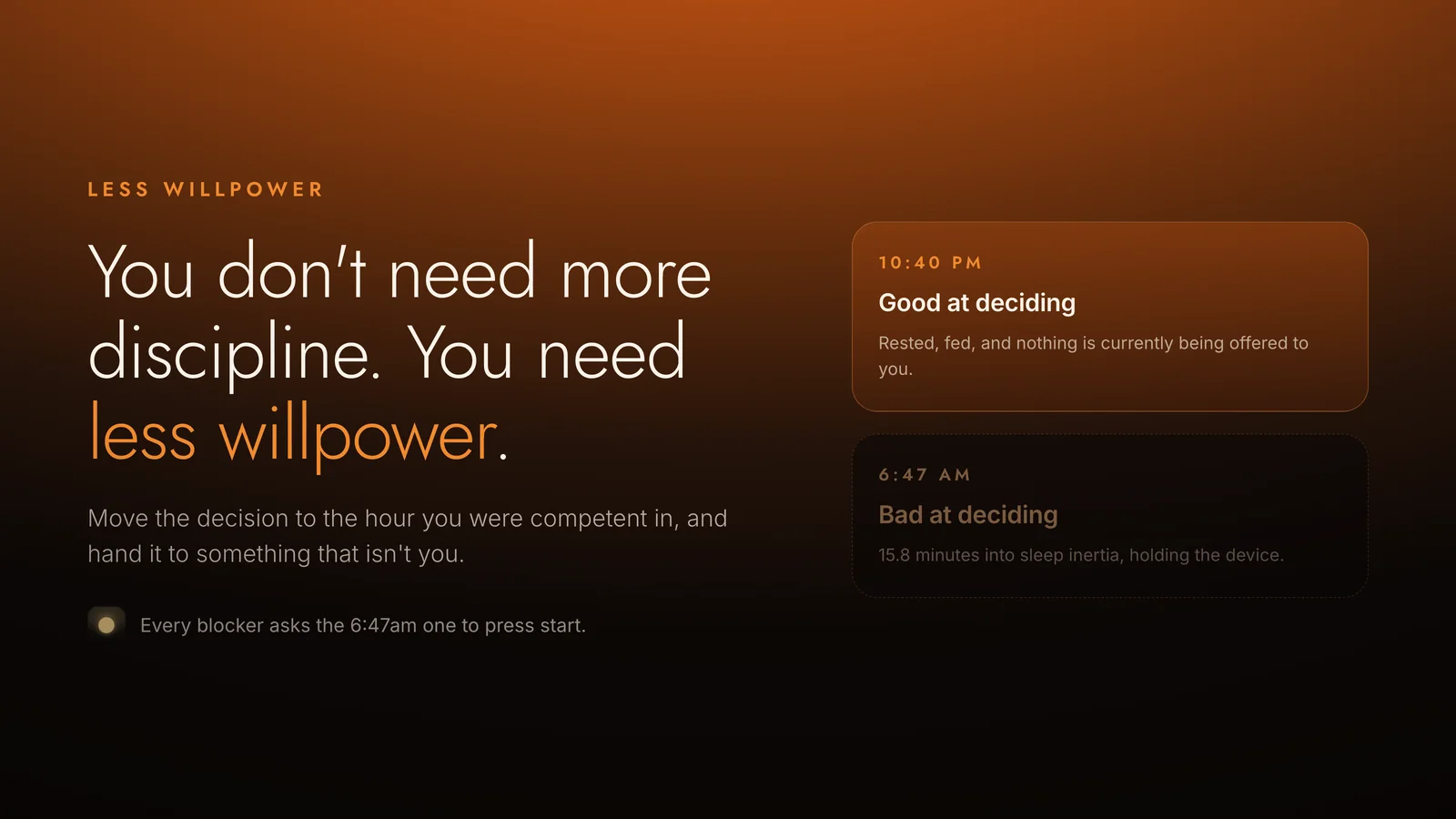
I build a morning app, so I read a lot of the self-help version of this argument. It is usually right and it always stops one step early.
What "less willpower" actually means
Discipline advice loads the moment: be stronger when the moment comes. Friction advice moves the moment: arrange things so the moment never arrives, or arrives when you can handle it.
In practice there are only three ways to use less willpower, and they are all about placement rather than strength.
- Fewer decisions. One rule that covers a hundred mornings instead of a hundred small calls.
- Earlier decisions. Made at 10:40pm by the version of you who is rested, fed and not currently being offered a video.
- Decisions carried out by something that isn't you. A timer, a geofence, a tag on the kitchen counter.
The third one is where almost all consumer advice quietly gives up. "Put your phone in another room" is a decision carried out by you, every single night, forever. It works beautifully for about nine days.
The "willpower is a fuel tank" story didn't hold up
You have probably been told that self-control is a muscle that tires, so by evening your tank is empty. That idea is called ego depletion, it came out of Roy Baumeister's lab in 1998, and it is the reason half the internet tells you to make your important decisions in the morning.
It is also in serious trouble, and if I'm going to lean on the willpower argument I should say so.
An early meta-analysis pooled nearly two hundred experiments and found a medium-sized effect, which is how the idea became textbook. Then people tried to replicate it properly. A preregistered replication across 23 laboratories with 2,141 participants, published in 2016, found no effect distinguishable from zero. A second effort in 2021, 36 labs and 3,531 participants, using a design the original authors helped build, found a difference of d = 0.06 and reported the data were about four times more likely under the null than under the effect.
So: don't build your morning on "my willpower tank is empty". It might not be a tank at all.
The practical conclusion survives anyway, for a reason that is measured, and it is not about strength. It's about timing.
What is measured: the first sixteen minutes
The state you make the morning decision in has a name. Sleep inertia is the grogginess window right after waking, when reaction time and judgement are worse than they will be at any other point in your day.
A nationwide study of 2,355 adults published in PLOS ONE in January 2026 put average morning sleep inertia at 15.8 minutes, with a standard deviation of 12.9. That is the window in which you decide whether to open Instagram.
One result in that paper is the one worth keeping. Participants with anxiety reported their grogginess running 14.3 minutes longer than those without, and it was the largest effect the researchers measured, at a Cohen's d of 1.12. If you wake up already braced about the day, your bad-judgement window is close to twice as long, and the first thing within reach is the thing that feeds it.
On top of that, cortisol climbs somewhere between 38% and 75% in the first thirty to forty-five minutes after waking in most healthy people. That happens on its own; your phone does not cause it. But it does mean the feed reaches you during a window your body already spends winding itself up. I wrote about the three signs that convinced me this was a real problem, and that was the one I couldn't argue my way out of.
None of that is a willpower deficit. It's a scheduling error. You have arranged for an important decision to be made by the least capable version of yourself.
Every blocker has the same hole: something has to start it
Here is the part the self-help essays never reach, because it requires opening the apps.
Install almost any blocker and the default flow is a session. You choose the apps, you choose a duration, you press start. That is a well-designed product and a badly placed decision, because the moment you most need the block running is the moment you are least likely to open an app in order to start it.
A block you have to start is a block you have to win an argument for, and the argument is scheduled for the worst sixteen minutes of your day.
There are only four shapes a trigger can take, and they are not equally honest about what they need from you.
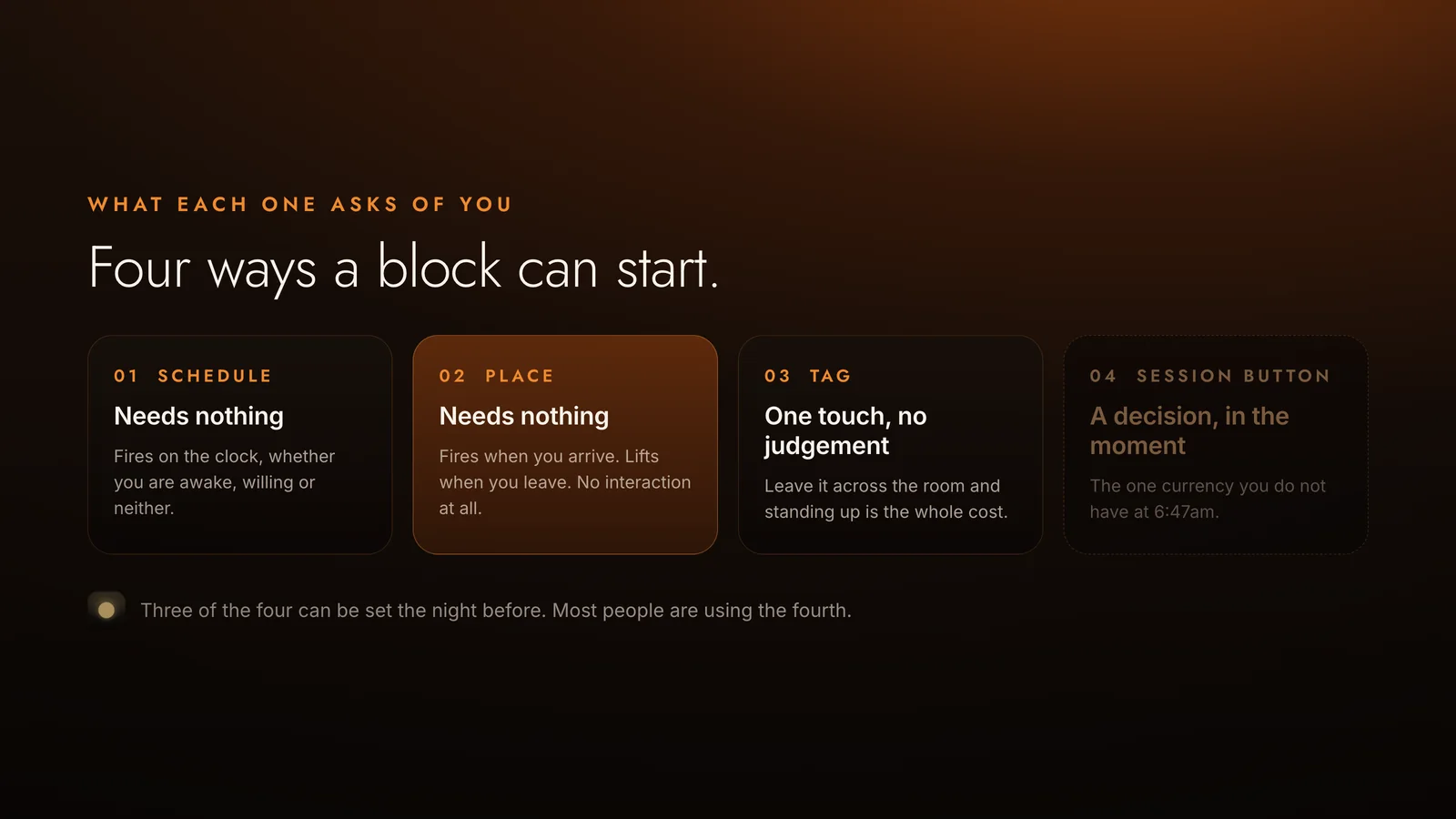
A schedule asks for nothing. A geofence asks for nothing; you just arrive. A tag asks for one physical touch but no judgement, and if the tag lives across the room then standing up is the whole cost. A session button asks for a decision, which is the expensive currency.
Three of those four can be set the night before. Most people are using the fourth.
Which blockers actually fire without you, checked this week
I went and looked, because I was about to claim this was rare and it isn't. Automatic triggers are all over this category. If anyone tells you otherwise, including me, check.
Schedules are universal. Freedom runs recurring sessions across your devices with a locked mode, at $8.99 a month or $39.99 a year. Opal has schedules on its free tier. AppBlock has them. Brick's own site says it will "automatically block apps at times that work for you".
Geofencing is common, and better than I expected. Opal PRO states plainly that it will "block access to apps in specific locations, such as at work or in educational institutions", and its most recent release notes say geolocation blocking was optimised so restrictions "activate faster & more accurately". AppBlock's App Store description is just as direct: "automatically block apps based on time, location, or Wi-Fi." There are also whole apps built on nothing but this idea: Geolock, Focus Fence and Fokus Zone are all on the App Store right now selling location-triggered blocking as the main feature.
Physical tags are a small industry. Brick is $59 for the device, and there is now a Brick Night at $129 that uses a Bluetooth zone to block your doomscroll apps when you enter your bedroom. Unpluq sells a tag at $79 a year. And Foqos is free and open source, works with any NFC sticker or a printed QR code, and asks for no subscription at all.
Foqos deserves its own line. If all you want is tap-a-tag blocking and nothing else, the honest answer is that the app is free and the stickers cost a few dollars, and you should start there rather than with any of us.
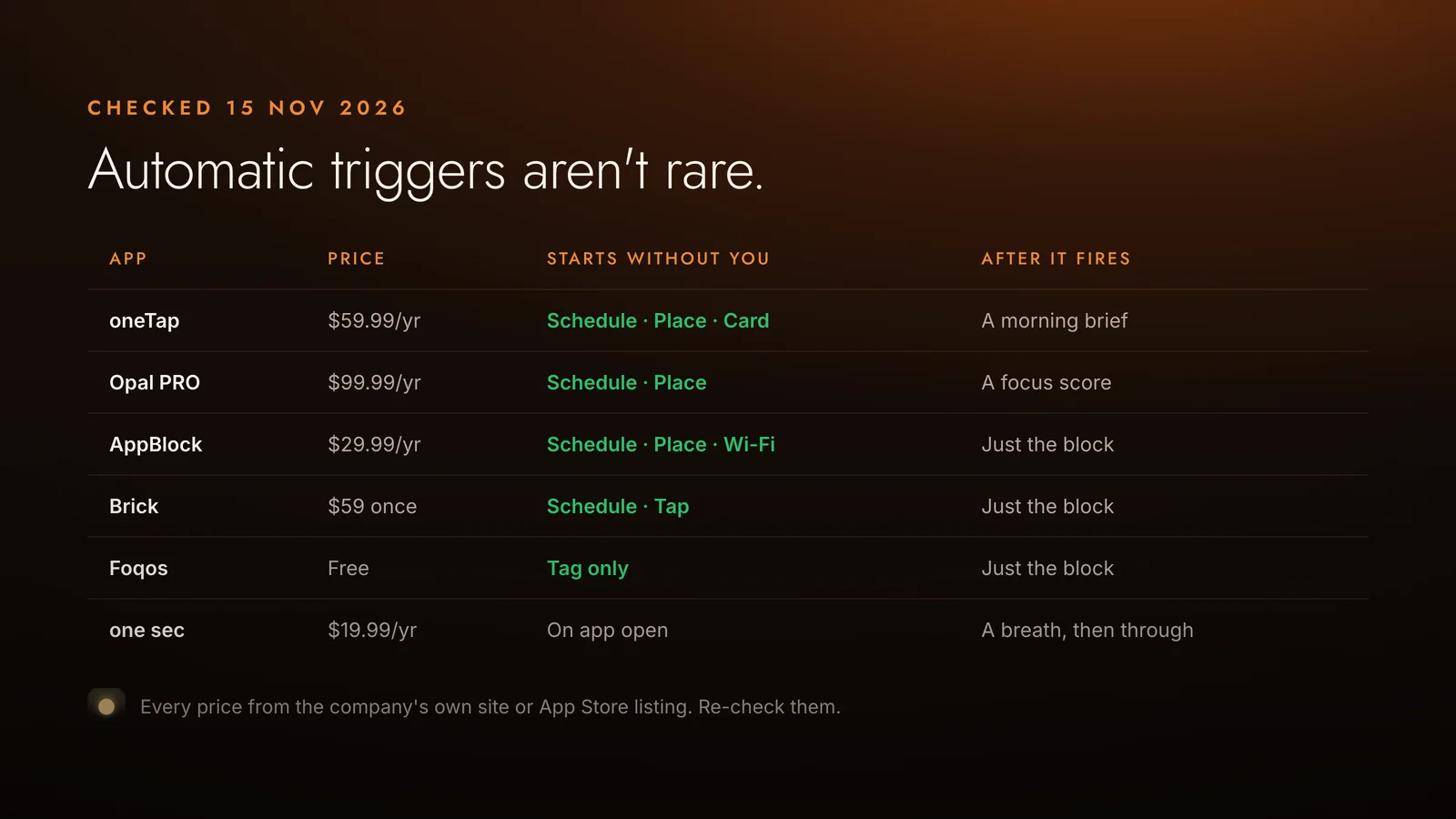
So the thing that separates these apps is not whether a trigger exists. It's what happens in the five minutes after the trigger fires, and whether you can undo it from inside the app. I've written up how oneTap, Opal, Brick and one sec each handle the early unlock, which is the part where most people actually give in.
What automatic blocking still can't do
Four things, and anyone selling you a trigger should say all four out loud.
It can't stop you revoking permission or deleting the app
Software blockers on iOS are built on Apple's Family Controls framework, mine included. Turn the app's Screen Time permission off in Settings, or delete it, and any block ends. No App Store app can close that door, and anything claiming otherwise is overselling.
Two products genuinely route around it, and they deserve the credit. Brick puts the unlock in an object you can leave in another room: "flexible to start, strict to stop." SHIFT puts the off switch on a desktop app your phone doesn't control, blocks uninstalling while a shift is on, and charges $149 once for a single device. Both are harder to beat than anything I can ship. Both also still need you to decide to start, which is the thing this whole post is about.
iOS geofences are not perfectly reliable in the background
This is the caveat nobody selling location blocking volunteers, so here it is from a competitor's own documentation. AppBlock's help pages say that since iOS 18, Apple changed how background location works, "which sometimes caused Location schedules to activate only after opening AppBlock", and that it still misbehaves on some devices.
That is not a knock on AppBlock, which is being more honest than most. It is the shape of the API. Every geofence on iOS is asking the system for a background wake-up it may not get promptly, and that applies to oneTap's Place mode exactly as much as to anyone else's.
It can't tell you whether your rule was any good
Automation makes a bad rule bite harder. Block eight hours when ninety minutes was the real need, and you'll be revoking permissions by Thursday. The lesson you take from that is "blockers don't work for me". The actual lesson is that you wrote a rule you couldn't live with, and then automated it.
Set the window shorter than feels impressive. Ninety minutes is the number most people stick to.
It can't answer the questions that sent you to the feed
You reach for your phone in the morning for real reasons. What's on today. Whether anything broke overnight. How badly you slept. A block that lands on top of those questions without answering them just relocates the restlessness, and you'll go looking for it somewhere the block isn't.
This is the one that automation can't touch, and it's the reason I built what I built.
Where oneTap fits
I built oneTap around that last point, and the triggers came out of the same logic.
There are four ways a block starts. Morning runs when you finish the brief and tap "Start my day". Place fires when you arrive at the office or the gym and lifts when you leave, with no interaction at all. Card is an NFC tag you tap, which you can leave anywhere in the flat. Anytime you start by hand.
Here's the honest count, because I'd rather give it than let you assume all four are automatic. Place fires with nothing from you. Card asks for a touch and no judgement. Morning asks you to read and tap once, which is a decision, but it's one you make holding a screen that has just answered your questions rather than a screen that is only saying no. Anytime is fully manual, and it's there because sometimes you do just want a block right now.
What is genuinely different is what the trigger hands you. You wake up and read a two-to-three-minute brief first: how you slept and recovered from WHOOP, Oura or Apple Health, your calendar, the emails that matter, the weather, your balances, five headlines, your tasks. There's a spoken brain dump that sorts itself into a to-do list and a journal. Then the apps you picked go dark, for anywhere from 15 minutes to 8 hours. The questions get answered before anything locks, which is the only way I've found to stop the restlessness going looking for another door.
Two smaller things that matter more than they sound. There is no early-unlock button inside the app: no "one more minute", no "ignore for today". The window runs to the end.
And oneTap has its own alarm, which does something the stock iPhone one doesn't. You can set several alarms as a group and control how far apart they ring, so the spacing itself is what confirms you're actually awake, rather than one alarm you dismiss without ever surfacing. That matters here more than it looks, because everything in this post assumes the brief reaches a person who is conscious.
Nothing is blocked by default. You pick each app, or a whole category like Social. Phone, Messages, Maps and anything you didn't choose stay open the whole time.
Move one decision tonight, with no app at all
Before you buy anything, test whether this argument is even true for you:
- Pick your window. Wake time to wake time plus ninety minutes.
- Put it on a Screen Time schedule, and set a Screen Time passcode. The Block at End of Limit toggle does not appear in the UI until you do, which is why most people conclude Screen Time doesn't work.
- Write the window on paper and leave it on the nightstand, so tomorrow's you can't claim it was never agreed.
If that holds for three mornings, the problem was placement, not discipline, and you now know what to pay for.
The honest cons, same as always: iPhone and iPad only, no free plan beyond a 7-day trial and then it's $7.99 a month or $59.99 a year, and the brief is thin until you connect WHOOP, your mail or your calendar. It's also new, with a 5.0 rating built on 17 ratings, which is a real score and a small sample, and you should read it as one. The FAQ covers what each connection reads and what happens to your data if you cancel.
Decide tonight, not tomorrow
If you take one thing from this: stop auditing your character and start auditing your triggers. Every rule you keep is one you set in advance and handed to something else to enforce. Every rule you break is one that waited to ask you at the exact minute you were least able to answer.
So go and look at whatever blocker you already have, and find out what it needs from you to start. If the answer is "a decision, in the moment", move it. Tonight, while you're still the competent one.
And if the moment you're trying to design around is the one where you're still under the duvet, that's its own article: how to stop scrolling in bed in the morning, with five fixes ranked by what each one costs you.
Get your mornings back
A three-minute brief, then your distracting apps go dark. Free for 7 days.
Download oneTap